
Commissions and payouts
On this page
With Standard and Premium, every line of a bill earns a commission for its technician (the person assigned to the ticket, unless a person who may Set commission rates chose someone else for a line). Commissions are paid through payouts, one per person and pay period.
Commission on the profit
By default a line earns a share of its profit:
profit = price × quantity − discounts − part cost − shipping − job costs − card feescommission = profit × rate
- Tax is never part of it.
- A line that lost money earns nothing (never a negative commission).
Example: a screen sold for $250.00 plus 7% tax ($17.50). The part cost $100.00 → profit $150.00 → at 50% the technician earns $75.00. Add $10.00 shipping as a job cost → profit $140.00 → $70.00.
Which rate applies
The first one that is set wins:
- the commission typed on the bill line;
- the commission of the catalog item;
- the technician's own rate (set on the user, under Team → Users);
- the company's Default commission (50% unless you change it on the Company Profile).
Roles carry no rate. A rate of 0% is a real rule: that line earns nothing. The rule is read when the bill is issued and kept with it. Rates on lines and items are set and shown only to people with Set commission rates.
A fixed amount instead
A line or a catalog item can earn a fixed amount per unit instead of a share of the profit. In the line or item, under How the commission is earned, choose Fixed per unit instead of % of profit and type the amount. Two units of $20.00 earn $40.00.
- A fixed commission does not change with costs, job costs or card fees.
- A refund takes its share back, and voiding the bill cancels it.
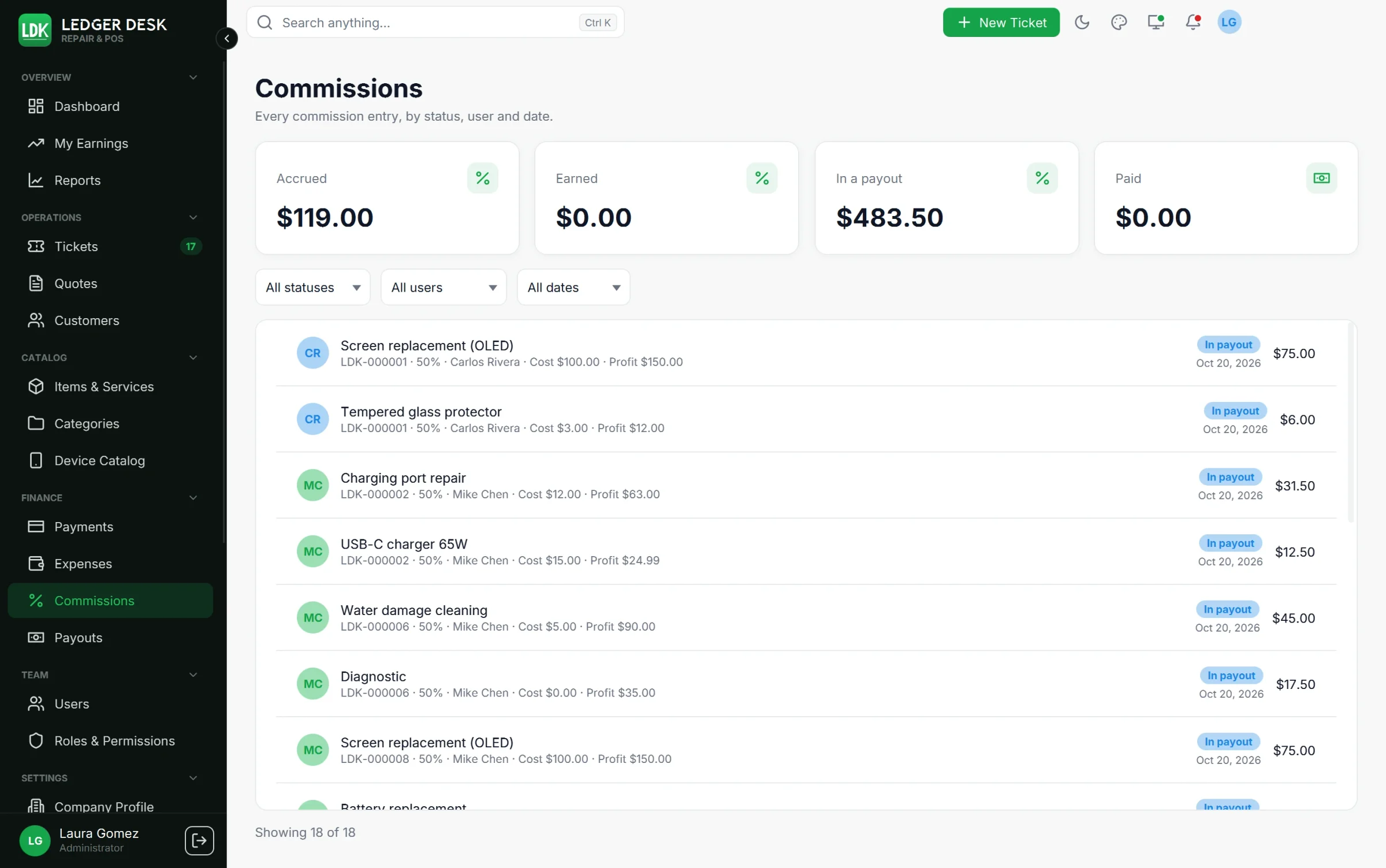
- The Commissions list shows it as “Fixed $40.00”, and the payout statement says “Fixed” in the rate column.
The store owner
One user can be the store owner. The owner earns what the technicians do not: the whole profit of their own lines, and the rest of every other technician's line. To mark the owner, open the user under Team → Users and tick This user is the store owner (only people with Set commission rates see it). Only one person can be the owner: ticking somebody else takes the mark from the previous owner.
| Line of | $250 sale, $100 part ($150 profit), technicians at 50% |
|---|---|
| Technician A | Technician A $75, owner $75 |
| Technician B | Technician B $75, owner $75 |
| The owner | Owner $150 (always 100%) |
| Nobody | Owner $150 |
- The owner's share follows the same rules as any commission: it waits until the bill is paid in full, refunds and bounced payments take it back, and it is paid through the owner's own payout.
- On the Commissions page and the payout statement each line says where it came from: Store share of the technician, or Own sale. When the technician earned a fixed amount, the rate column says The rest.
- The owner's share can be negative: a job that loses money, or a fixed commission larger than the profit, lowers it (the store paid it).
- It counts as commission in the Profit and loss report and on the dashboard.
- Only bills issued after the owner was marked give the owner's share; bills already issued never change. Unticking the box, or disabling the owner's account, stops it for new bills.
When a commission can be paid
| Status | Meaning |
|---|---|
| Accrued | The bill is issued but not paid in full yet. |
| Earned | The bill is paid: the commission waits for the next payout. |
| In a payout | Included in a payout that is not paid yet. |
| Paid | Paid to the person. |
A commission is earned only when the bill is paid in full. A ticket that is unpaid or only partly paid waits in the queue, however long payment takes; money that waits to clear (a check or a transfer) does not count yet. The day the last cent arrives, the whole commission becomes payable and the next payout takes it.
Corrections
- A refund, a void or a job cost added before payout simply changes or cancels the entry.
- After the entry was paid, history is never edited: a correction (positive or negative) is created and lands in the person's next payout.
- A payment that bounces (a check voided after its commission was paid) takes that commission back from the person's next payout. When the bill is paid in full again, the commission is earned again.
- A bill that stops being paid in full while its commission sits in a payout that is not paid yet leaves that payout; an approved payout goes back to a draft.
- Voiding a bill always takes back exactly what its commission was still worth, so a voided bill earns nothing in the end.
- The Commissions page lists every entry with filters by period, person and status; people without see all rights see only their own.
Payouts
The pay period is set on the Company Profile (Commissions are paid: Every week, Every two weeks or Every month; the week starts on the day you choose). A payout goes through these steps:
- Generate payouts (needs Generate and adjust payouts): choose the period, usually the Last pay period, look at the Preview, then generate. One draft payout is made per person with every earned commission (and correction) of the period that is not in a payout yet.
- Review each draft in its drawer: Add adjustment (Bonus, Deduction or Advance, each with a reason) and Reimburse expenses to pull in the person's approved employee-paid expenses.
- Approve the payout. It is now locked.
- Mark as paid (needs Mark payouts as paid) with the payment method and an optional Reference. Reimbursed expenses become Reimbursed.
- Open the Statement PDF to print or save it: every entry with its document number, date, item, net, cost, profit, rate and commission.
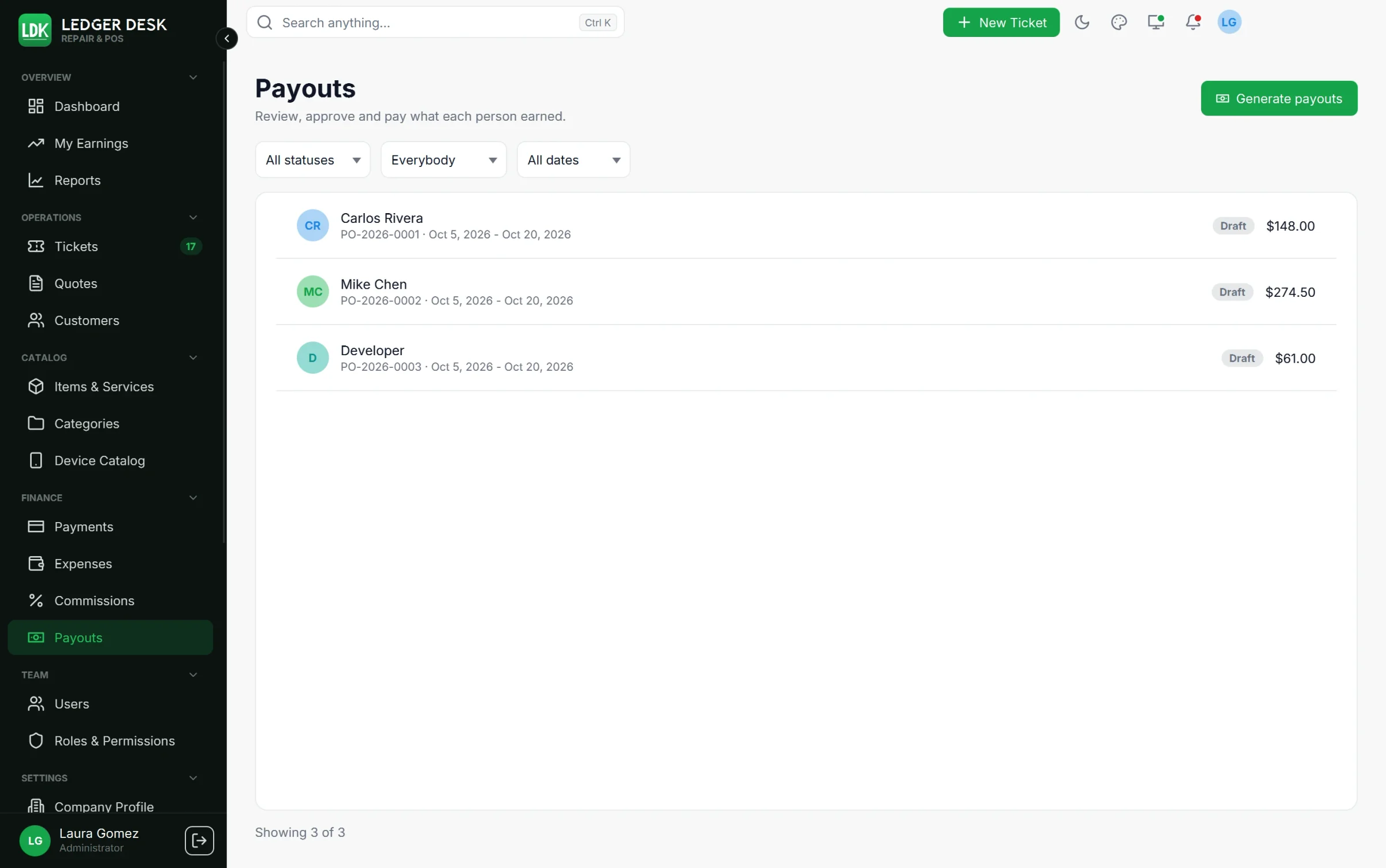
- No double pay: a commission belongs to one payout only.
- A person who has employee-paid expenses but no commission gets an empty draft so the expenses can be paid back.
- Void a payout before it is paid to release its entries back to Earned. A paid payout can be voided only by a Developer or Admin, with a reason; its entries go back to Earned and its reimbursed expenses back to Approved.
- Filter the list by status, by person and by the day the pay period ends.
The person filter of Commissions, Payouts and the reports lists everybody who ever earned commission, also people who no longer take tickets.
My Earnings
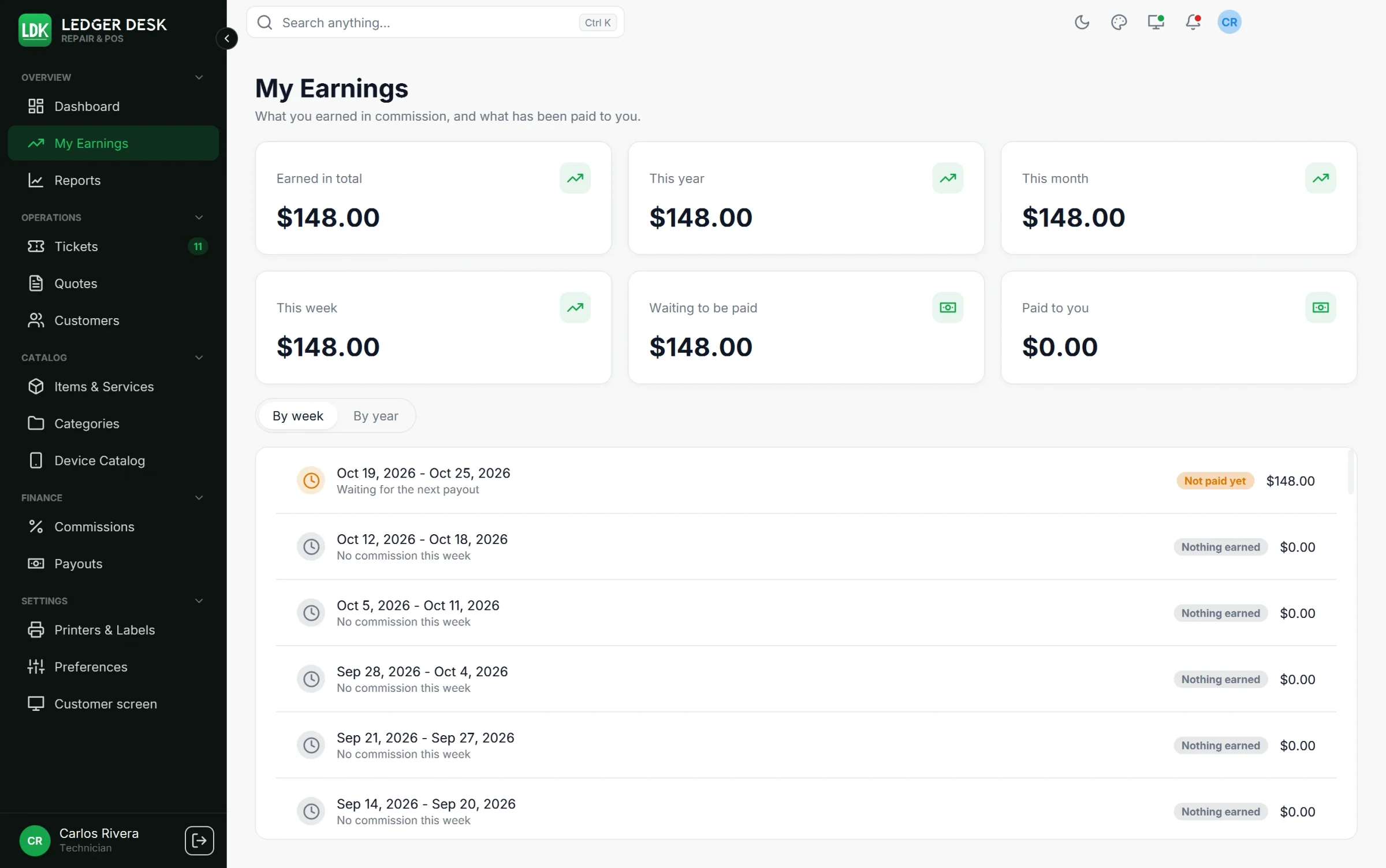
Every user sees Overview → My Earnings: earned in total, this year, this month and this week, what is waiting to be paid and what was paid, plus what is still pending from bills customers have not fully paid. The list shows every week (By week) or year (By year) with its state and the payout that paid it. On the dashboard a technician's fourth card is My commission.
Last updated November 3, 2026